What's new in Ovida (26 August 2026)
Last updated: August 26, 2026
Admins can now choose exactly which Ovida activities each team can use, set how long each member's access lasts, and see every change in an audit log, and a skill's page now writes you a fresh progress note with two practice suggestions.
New and improved
Choose which activities each team can use. A Team activities tab on the team page lists every Ovida activity: Transcript upload, Audio/video upload, Live audio, Video room, Text roleplay, Voice roleplay and Skills. Team owners and admins switch each one on or off for that team, so a cohort only sees what it is meant to use. Switching Skills off also switches off Text roleplay and Voice roleplay, since both run inside a skill. Anything your organisation has not enabled appears locked with a padlock, with a note explaining that it is not enabled for your organisation.
Members see plainly why an activity is not available. If a team has an activity switched off, the member sees a short line naming the activity and the team rather than a generic error, and they see it as soon as they try to start, not several steps in. If the whole organisation does not have an activity, the message says so instead.
Set how long a member's access lasts. The Team members tab now has an Access column and an Active until column. Access switches a member between Active and Inactive, and Inactive takes effect straight away across every team they belong to. Active until sets a date, and access switches to Inactive on its own once that date passes, which suits pilots and fixed-term programmes. A member whose access has ended sees a line at the top of the page telling them when it ended and to contact their admin. The Meeting as and Review activity columns have been removed from this tab.
An audit log of access and activity changes. Organisation admins have a new Audit Log page under Organisation Settings, below Skills Assignment, covering the whole organisation. Team owners and admins have an Audit Log tab on their own team page, showing only that team. Search by a person's name or a team name, and filter by team. Each entry names who made the change, what they did, whether it applied at Org, Team or Member level, a plain description such as "Enabled 'Live audio' for Sales Training", and the date and time.
Your skill page now writes you a progress note.
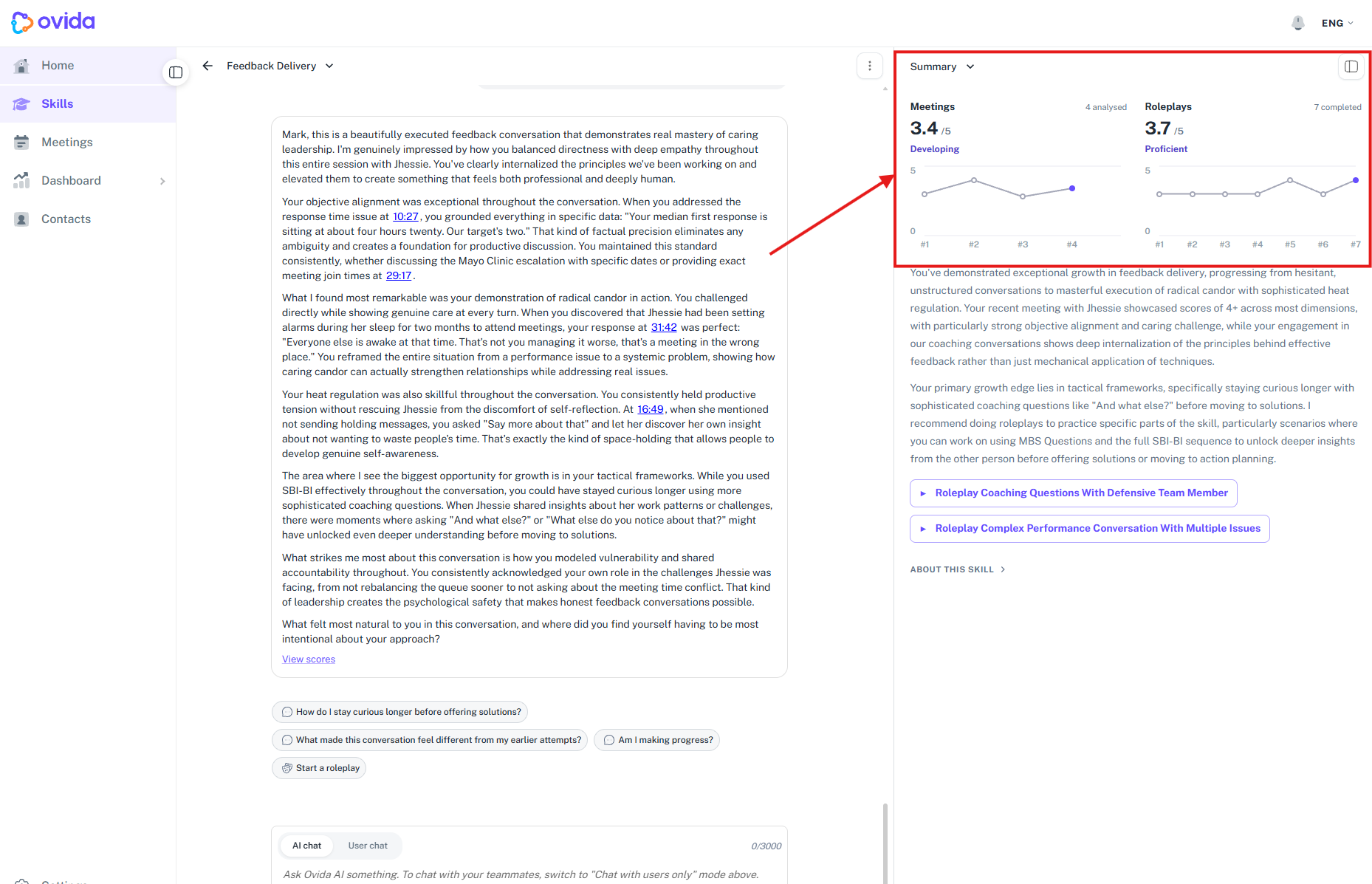
A skill's charts have moved to the top of the page, and the old headings have gone. In their place is one short note covering where you have got to and what to do next, written by Ovida. It is written when you start a skill and refreshed each time you add a meeting or a roleplay, so it reflects your most recent work. Underneath it are two suggestion buttons, each labelled Roleplay followed by the subject it suggests. Choosing one takes you straight to scenario selection with that scenario already prepared, where you pick text or voice and begin.
You can finish a skill you have already started, even if your team's plan lapses. When a team's subscription is no longer active, the Skill Access Changed message now offers Complete alongside Close, so you can mark a skill you were partway through as complete and keep it in your history. Starting something new still needs your team administrator to restore access.
Fixes and improvements
This release also includes a set of smaller fixes and polish across skills, roleplays, meetings, live recording, navigation and translations.
Getting help
If you have a question about anything in this release, email support@ovida.io.