What is the Team Assistant role?
Last updated: May 25, 2026
Team Assistant is designed for executive assistants and admin staff who schedule meetings for team members, but who shouldn't see meeting content or performance data.
A Team Assistant can book meetings on behalf of others without having access to confidential meeting content or sensitive team performance data.
What Team Assistants can do
Create meetings on behalf of other team members
Add or remove team members
View the list of meetings scheduled within the team
Access the team's Usage tab
Access the team Dashboard
What Team Assistants can't do
Access meeting recordings, transcripts, or AI analysis
View the Meeting Review page for meetings they create
Add observers to meetings created by other members (or after a meeting ends)
View the Team Metrics tab
Edit the Usage cap
Access billing
In short: Team Assistants manage scheduling, but they don't see sensitive content.
How to assign the Team Assistant role
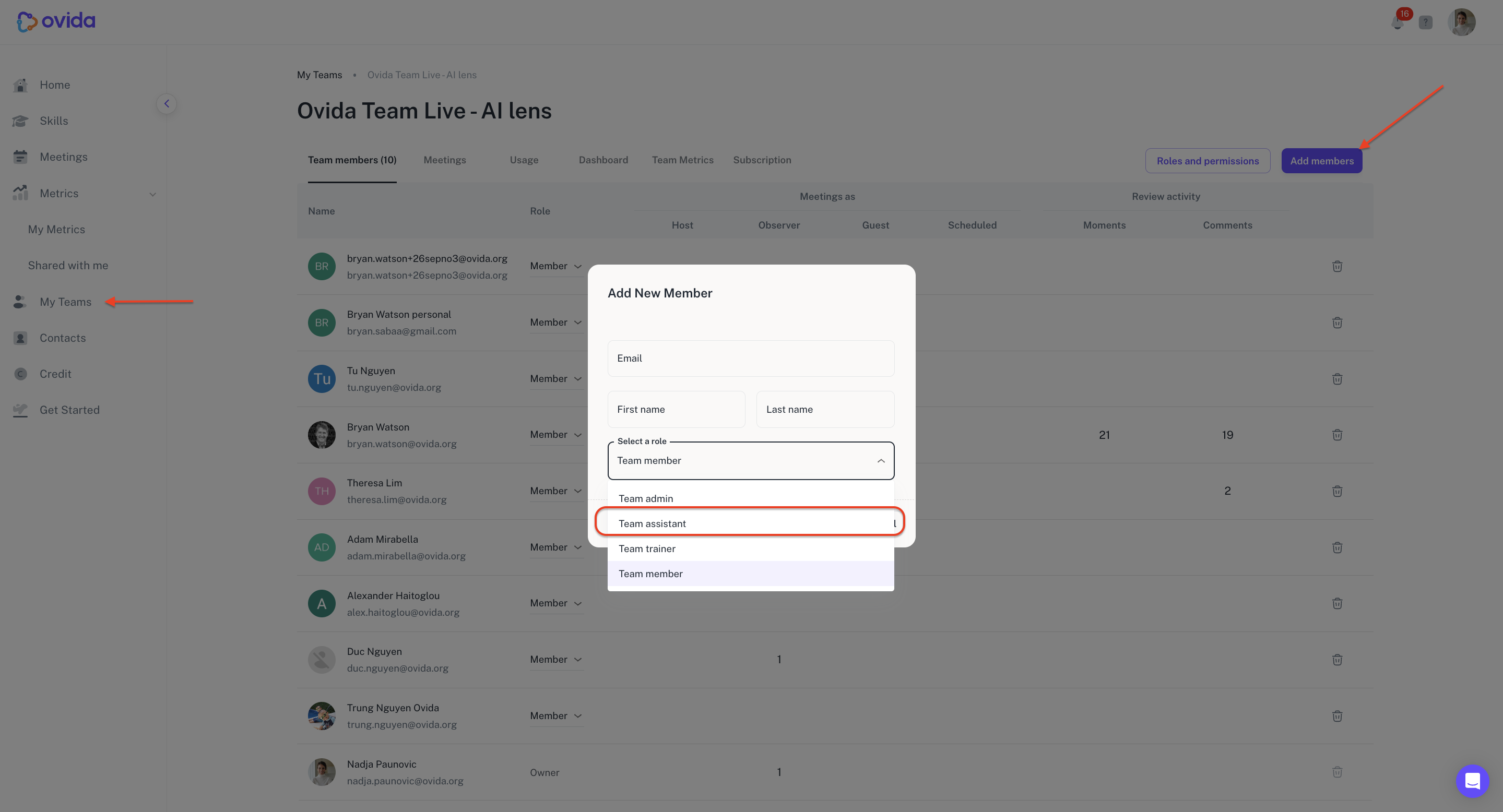
A Team Owner or Team Admin can assign this role when adding a new team member.
Go to My Teams > select your team.
Click Add members.
Enter the person's email, first name, and last name.
Choose Team Assistant from the role options.
Confirm.