How do my internet and hardware affect call quality?
Last updated: May 24, 2026
Ovida's analytics need high-fidelity recordings. Your connection, device, and network all affect the result.
Ovida's analytics rely on capturing subtle moments in conversation, which depend on clear, stable audio and video. Several things affect call quality:
The device, software, and operating system each participant uses
The strength and stability of each participant's internet connection
Regional and global internet performance
Supported devices
Ovida works on most computers and mobile phones, popular browsers (Chrome and Firefox), and major operating systems (Windows, Android, macOS).
Is my internet connection good enough?
The easiest test is to look at your recent online experience.
Your connection is likely fine if:
Streaming services play smoothly in HD
Multiple people can stream video at the same time
Other video call platforms have consistently clear audio and video
It may not be sufficient if:
Streaming services only play in SD
You can't stream more than one video at once
Video or audio is often pixelated, glitchy, or distorted on other video call apps
Recommended connection speed
For the best call quality, aim for:
Upload and download speeds of 10 Mbps or higher
Latency under 250 ms
Calls can still work below these levels, but quality will likely drop.
Run a speed test before your first call or whenever quality slips. Search "internet speed test" online to do this.
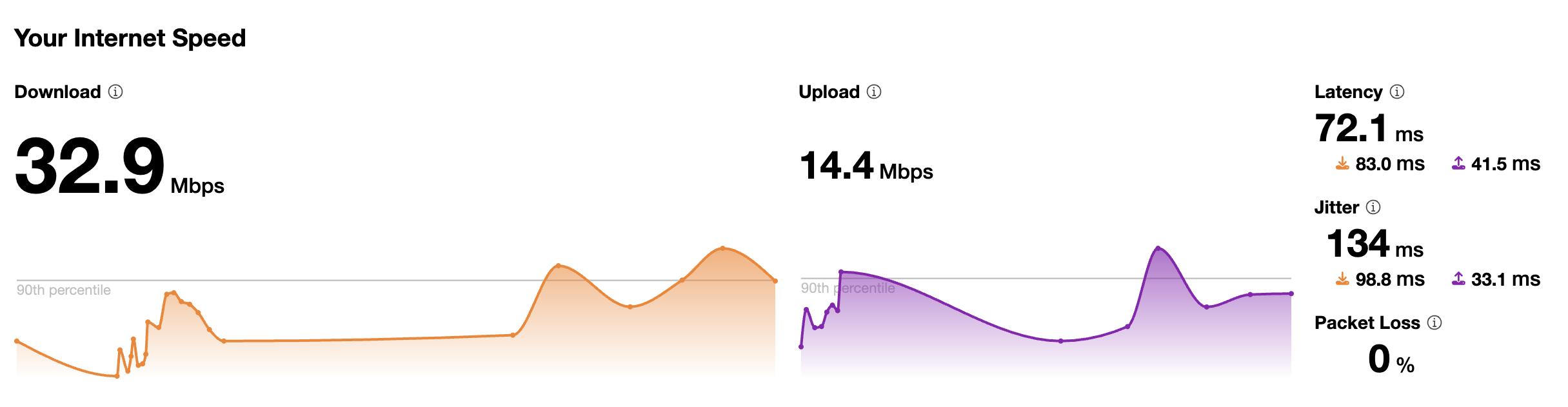
How to improve call quality
Avoid using old devices where possible
Keep your device's firmware up to date
Limit unnecessary activity on your network
Close applications and browser tabs you don't need
On Wi-Fi, move closer to your router or place it in an open space without obstructions
On mobile, use Wi-Fi instead of LTE or 4G when possible
Disconnect from a VPN if you're on one (common on corporate networks)