How do I choose the language for a skill or roleplay?
Last updated: October 21, 2026
When you launch a skill, you choose the language it runs in. That language is used for the AI roleplay, its voice and your feedback, and it cannot be changed after the skill is launched.
Choose a language
Go to Skills and find the skill you want to practise.
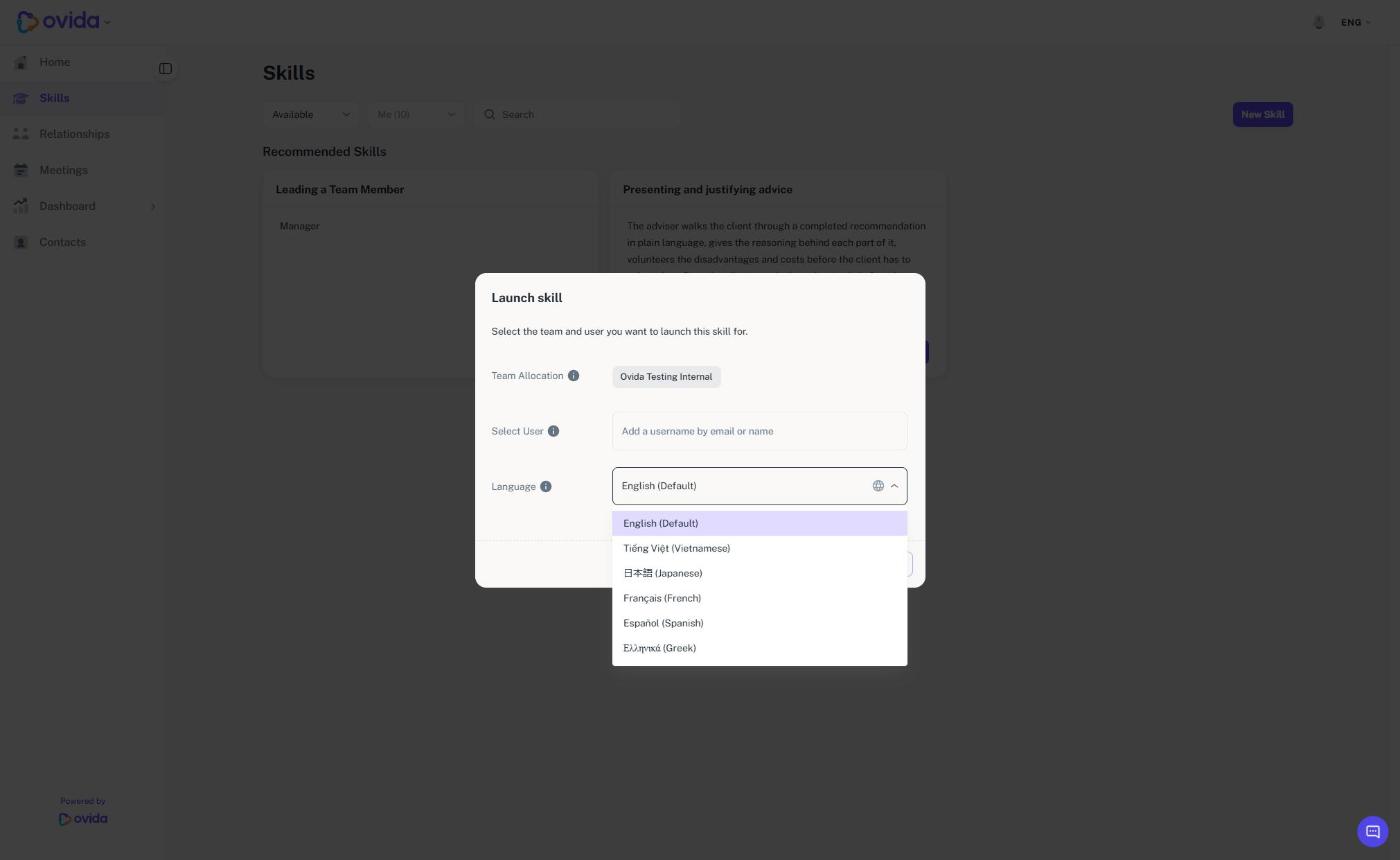
Select Start. The Launch skill dialog opens.
Check Team Allocation, and use Select User to choose who the skill is for. You can search by name or by email address.
Open the Language list and select the language you want. It starts on the default language for your organisation, for example English (Default). The list can include English, Vietnamese, Japanese, French, Spanish and Greek.
Select Launch skill.
What the language applies to
The AI roleplay speaks and listens in the language you chose, and your feedback is written in the same language.
Which voice does a voice roleplay use?
In Vietnamese, Japanese, French, Spanish and Greek, voice roleplays use a voice chosen for that language. In English, or in any language without its own voice, the standard English voice is used. You still choose the voice gender as before.
Important
The dialog shows "Language cannot be changed after launching." To use a different language, start a new session and choose it at launch.
If you cannot see the language you need
Your organisation controls which languages are available and which is the default. If you cannot see the language you need, ask your organisation's administrator or email support@ovida.org.
Existing transcripts stay in the language they were recorded in.